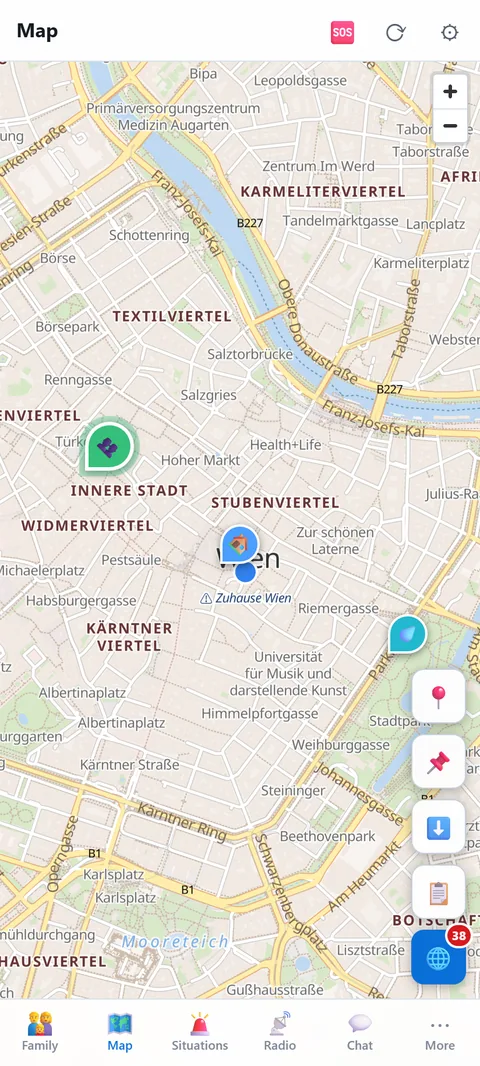
Map
🗺️Map
Your places, the situation layers and the offline map for when there is no network.
Buttons on the right
- 📍 Position: show your own position and follow it.
- 📌 Set marker: tap, then tap the map. Category (meeting point, water, shelter, medical, fuel, depot, danger), title, description. Markers are visible to the whole household and serve as storage locations, route targets and group locations.
- ⬇️ Offline area: “Save your places” stores the area around all markers and alert places in one tap (10 km each in full detail plus an overview). Until something is saved, a blue hint at the bottom of the map points to it. More about the offline map. “Save area” downloads the visible area. Three levels: nearby only (zoom 12–14), with overview (10–14, recommended), full zoom chain (8–14). Areas can be shared with the household so other devices load them from the server.
- 📋 Marker list: all markers with a jump to the map.
- 🌐 Situation: switch the event layers on and off (next section). The number is the count of current events.
Tapping a marker shows details, edit and delete. Group locations and locations shared by group members also appear on the main map.
Prepare before you need it
- Download offline areas for where you live, the way to work, the children's school and a fallback destination, once on Wi-Fi. Without a network the app cannot fetch new map pieces.
- Set two meeting points as markers: one close by and one further away in case your own neighbourhood cannot be reached. Everyone in the household sees them.
- Add water points, pharmacy, petrol station and the fire station. In many municipalities it is the contact point during a blackout.
- Share an area with the household: the other devices then fetch it from the Prepper server instead of each downloading it separately.
On the move without a network
GPS works without a mobile network and without internet, because the phone receives the satellites directly. Your own position therefore shows on the offline map even in a blackout. Indoors the first fix can take a few minutes; outdoors it is faster. To save battery, check briefly rather than leaving "follow the map" running all the time.
Without a network you miss new events in the Situation layers and the positions of others via the server. With radios, family members still appear on the map, at the position their device last transmitted.
Where the map comes from
The map data comes from OpenStreetMap and is served from Prepper's own server, not by Google or Apple. No advertising network learns which area you look at.