Radio
📡Radio
Chat, status and call for help without a mobile network and without the internet — via a small LoRa radio (Meshtastic) connected to the phone by Bluetooth. Three channels: family, group, public.
- Why: in a blackout or network outage, the mobile network is the first thing to go. The radios form their own network (mesh): every device relays, including foreign nodes — without being able to read along. A few hundred metres in town, several kilometres with line of sight.
- What you need: a Meshtastic device from about 30 euros (Heltec V3, Wio Tracker L1, T1000-E) and the app from the store (Android or iPhone). In the browser, radio only works in Chrome on Android or PC.
- Set up: switch on the new device, Radio → "Connect radio", then "⚙️ Set up": the app writes name, region EU_868 and all channels to the device itself. Switch "Base station" for a device that stays at home. The Meshtastic app is not needed; if you use it anyway, scan the "Channel QR".
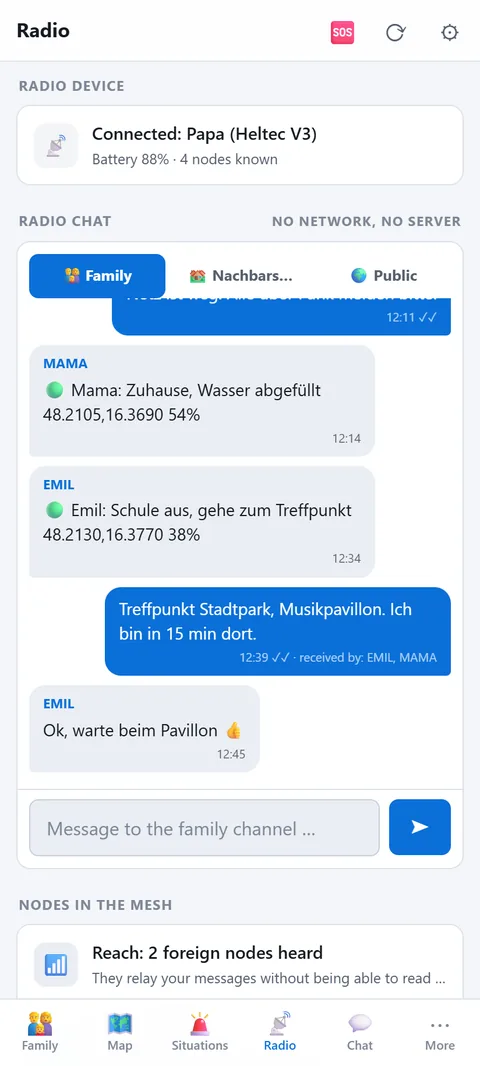
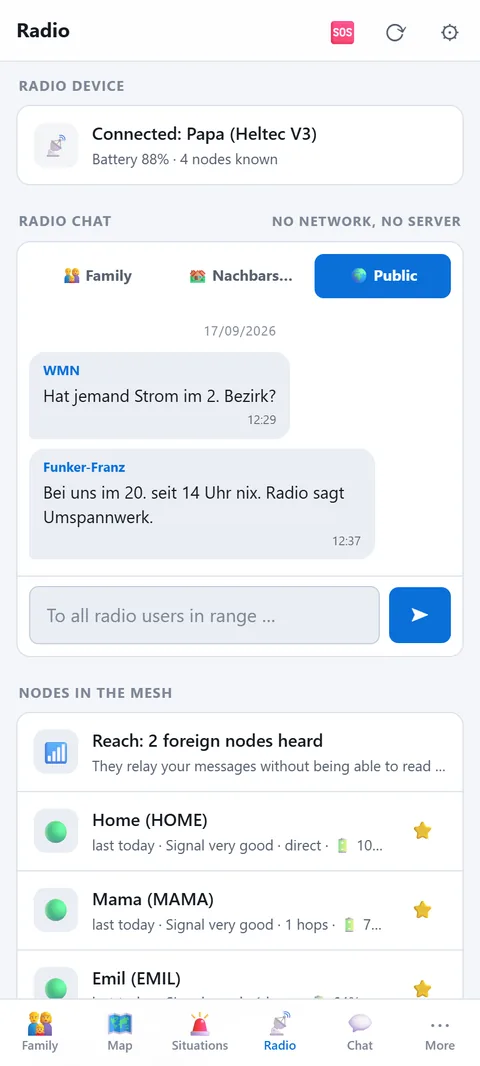
- Three channels: 👨👩👧 Family — encrypted with the household's secret code, with position. 🏘️ Group — own key per group (choose "📡 Radio channel" under Groups), coarse position. 🌍 Public — the Meshtastic default channel read by every node in range; no position, first message with a confirmation.
- Radio chat: up to 200 characters. One tick means sent, two ticks relayed by the mesh, "arrived: Mama, Emil" means their app really has it. If the device is away, the message waits and goes out by itself on reconnect.
- Nodes and reach: "Reach: 14 foreign nodes heard" shows how much mesh is around you right now. ⭐ marks the family; only those appear on the map. "📡 Ping family" asks live who answers.
- Call for help: goes with position and battery to the family channel. In the help sheet you can additionally switch on "also to all radio users in range" — for the case that nobody in the family can be reached.
- Limits: two places 80 km apart are not connected by any mesh — each location needs its own base station. A device with Wi-Fi (gateway) doesn't accept Bluetooth; set it up via the Meshtastic app on the same Wi-Fi.
How a family gets started
- One device for everyone who is out and about, and a base station at home, as high as possible: attic, top floor, window sill. Height brings more range than any accessory.
- Set up all devices through Prepper. They then share the same family channel automatically, without anyone typing in keys.
- Test once while the mobile network still works: write a message, watch the ticks, press "📡 Ping the family".
- Which device suits whom is on the page Radio for Prepper.
When something doesn't work
- No "delivered": the other device is out of range or switched off, or the app there is not connected. The mesh retries a few times. Send again later or look for a higher spot.
- Error 39: a direct message is missing the recipient's key. The app requests it by itself; after a short while it works.
- Error 38: the allowed airtime is briefly used up, because radio in the 868 MHz band may only transmit a small share of the time. Wait a few minutes.
- Many hops: the number shows how often a message was relayed. Even over a short distance it can take a detour via other nodes.
Privacy
The family and group channels are encrypted. Other nodes only relay and cannot read along. Your phone's position is only included when you send a status or distress call yourself. Any other position a radio transmits comes from its own GPS: exact on the family channel, rounded to about 1.5 km on the group channel, none at all on the public channel.