Prepper › Handbook › Simple view (kids)
Simple view (kids)
🟢Simple view (kids)
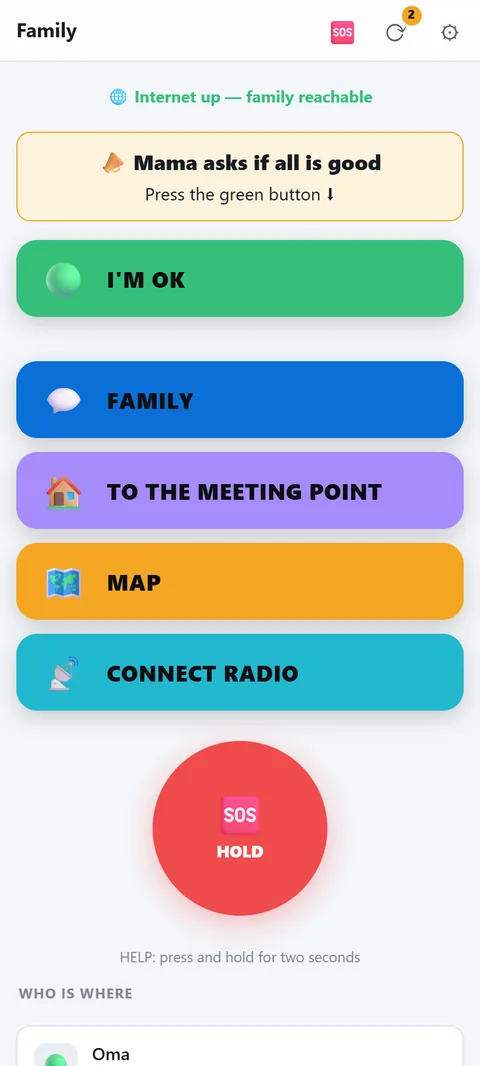
A child's phone shows only five big buttons instead of all tabs: I'm OK, Family, Meeting point, Map, Radio and the Help button. Everything else is hidden, nothing is locked.
- Turn on: on the child's phone gear → "Simple view (for kids)". This applies only to this device; the others in the household don't notice. Turn off in the same place.
- I'm OK: one tap sends status and position to the family — via the internet and, if a radio is connected, additionally via radio. Below it says honestly whether it went out.
- Family, Meeting point, Map: Family opens the chat, Meeting point jumps on the map to the active meeting point (or says none is set), Map shows the offline map with the family. The arrow top left always leads back.
- Help: the same red button as for the adults — hold for two seconds, then the family gets the alarm with position and battery level, on all routes. Nothing goes off by accident.
- Who is where: the family's check-ins with 🟢🟡🆘 and time, updates by itself. Push messages, chat and the bars at the top (call for help, situation) arrive in the simple view just the same.
- Deliberately no lock: the child can turn the view off again. It's about clarity, not control — in an emergency nobody should be stuck behind a lock.