Prepper › Handbook › Family (start page)
Family (start page)
👨👩👧Family (start page)
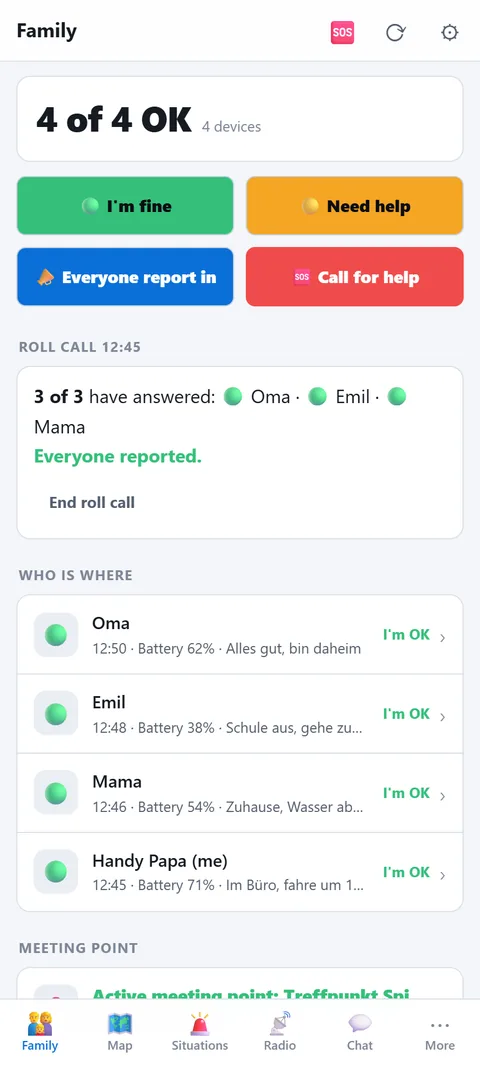
The first page of the app: who is where, who is OK, where do we meet. Everything that happens between the family's devices at a glance.
- Headline number: "3 of 4 OK" counts the status reports of the last 24 hours. If someone needs help, it appears in yellow first.
- Four buttons: 🟢 I'm OK and 🟡 Need help report your status with position and battery to everyone. 📣 Everyone check in asks every device "All good?". 🆘 Call for help opens the emergency button.
- Roll call: the question goes out via internet and radio at once, with alarm tone. Whoever answers taps once. The asker sees "2 of 3 have answered" and who is still missing — for an hour, then "End roll call".
- Who is where: the last report of every device with time, battery and text; tap to show it on the map. Reports via radio appear here just the same.
- Meeting point: the active meeting point with every device's distance. Create markers of type "Meeting point" on the map, activate here — everyone sees it immediately.
- Practice: the family drill (own section below) and when it last ran. After three months the line reminds you in orange.
- Channels: internet up or down, radio connected or not, notifications on or off, alert places, charge level of the family radios. Every line leads to where you fix it.